








Cloud storage has transformed the way we handle large files. Today, businesses and individuals alike rely on cloud solutions to store, manage, and share their data efficiently. In a world where file sizes continue to grow due to high-resolution images, videos, and complex documents, understanding how to use cloud storage effectively is vital. This guide will help you navigate the best practices and tools for managing large files in the cloud.
- Cloud storage allows easy access and sharing of large files across devices.
- Choosing the right provider is essential for security and scalability.
- Regularly organize and archive files to maintain easy access and manage storage costs.
Table of Contents
Choosing the Right Cloud Storage Provider
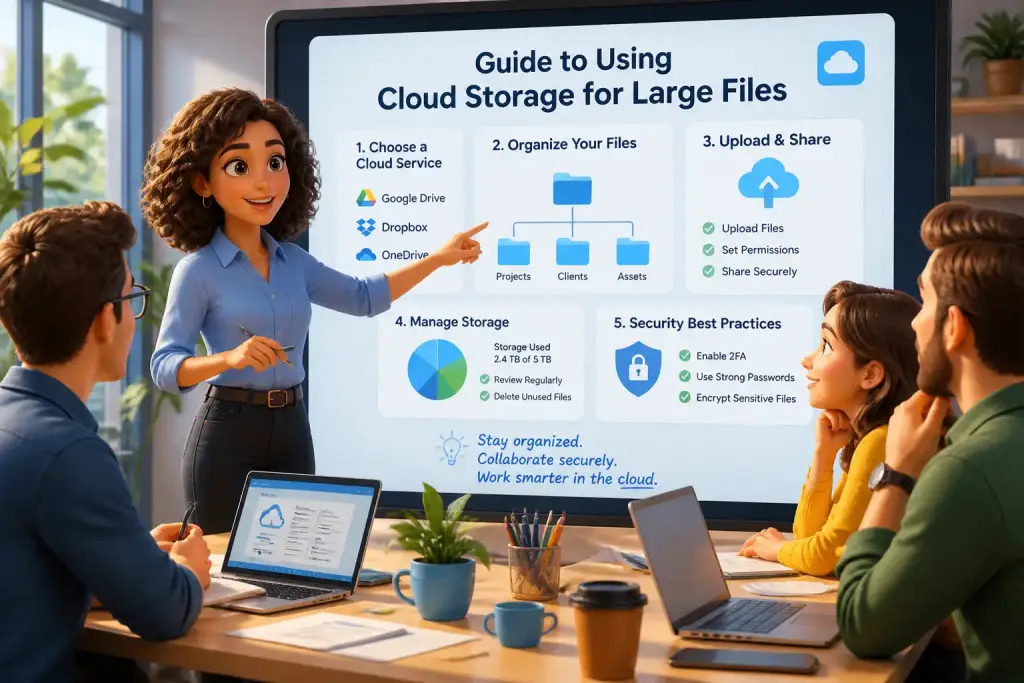
Selecting the right cloud storage provider is the first step in managing large files effectively. Numerous options exist, each offering distinct features and pricing plans. Popular choices include Google Drive, Dropbox, and Microsoft OneDrive. Each service has its strengths, like collaboration tools, security features, and storage capacity.
When evaluating a provider, consider these essential factors:
- Storage Capacity: Assess how much storage you need. Some providers offer free tiers, while others require a subscription for larger capacities.
- Security Features: Look for end-to-end encryption and multi-factor authentication to protect sensitive data.
- Collaboration Tools: Choose a service with features that allow team members to work together easily, such as real-time editing and commenting.
- Integration Options: Ensure the cloud service integrates with other tools you use frequently, like project management software or email clients.
Once you select a provider, set up your account and familiarize yourself with its features. Each service has its unique dashboard and tools, so take time to explore these options. This effort will pay off when you start managing large files efficiently.
Uploading Large Files to the Cloud
Getting your large files onto the cloud is the next critical step. Most cloud storage providers offer straightforward upload processes. However, knowing how to optimize this process can save you time and frustration.
Step-by-Step Upload Process
- Prepare Your Files: Organize files into folders on your device to simplify the upload process.
- Sign In: Log into your cloud storage account.
- Upload: Click the upload button, usually marked with a plus sign (+) or an upload arrow.
- Select Files: Choose the files or folders you want to upload. For very large files, consider splitting them into smaller parts if the service has size limits.
- Monitor Progress: Most services show an upload progress bar. Wait for the upload to complete before closing the window.
Some services allow you to drag and drop files directly into the browser window. This feature can make uploads quicker and more intuitive. If you are having trouble with large files, check the provider’s documentation for specific limits and tips.
Sharing Large Files with Others
Sharing large files with colleagues or clients can be straightforward with cloud storage. Most providers include sharing features that allow you to control who can access your files and how they can interact with them.
Effective Sharing Techniques
- Generate Shareable Links: Most services allow you to create links that you can send to others. Adjust settings to control whether recipients can view, comment, or edit the files.
- Email Sharing: Use built-in features to send files directly through email. This option often includes a link to the file rather than attaching it directly, which can help avoid inbox clutter.
- Set Expiration Dates: For sensitive files, some services allow you to set expiration dates on shared links, ensuring access is temporary.
Using cloud storage for sharing eliminates the need for large email attachments, making collaboration more efficient. Consider reviewing how to share large files easily for more detailed strategies.
Organizing and Managing Files
Once your large files are in the cloud, maintaining organization is crucial. A well-organized system makes it easier to find files when needed and can improve overall productivity.
Start by creating folders based on projects, clients, or file types. This structure helps you locate files quickly. Use relevant names and avoid generic titles to enhance clarity. Consider implementing a tagging system that allows you to add keywords or labels to files, making them searchable.
Regular Maintenance Tips
- Review Files Periodically: Schedule regular check-ins to delete or archive outdated files, freeing up storage space.
- Utilize Search Features: Leverage the search functionality of your cloud provider to find files quickly without scrolling through folders.
- Backup Important Files: Regularly back up critical data to another location, such as an external hard drive, to prevent loss.
Keeping your files organized is essential, especially when handling large projects. Applying these management strategies can save time and reduce stress.
Use folders and tags to categorize files, making it easier to locate large files quickly.
Archiving Files for Future Use
Archiving files is an often-overlooked aspect of cloud storage management. Proper archiving helps keep your active workspace clear while preserving important documents for future reference.
Consider these key points when archiving:
- Identify Files for Archiving: Look for files that are no longer actively needed but may be useful later, such as completed project files or historical data.
- Use Compression: Compress large files into zip folders to save storage space and make the download process easier for future access.
- Create Archive Folders: Designate specific folders within your cloud storage for archived files. This separation helps maintain clarity in your workspace.
For additional tips on archiving, check out this article on tips for archiving large files. Proper archiving ensures that your cloud storage remains organized and functional over time.
Using cloud storage for large files can greatly enhance your ability to manage and share data effectively. By choosing the right provider, mastering uploads, sharing efficiently, organizing files, and archiving properly, you set yourself up for success in this digital age.