








Working with large files can often lead to confusion and mistakes, especially when multiple people are involved. Tracking changes becomes vital to ensure accuracy and maintain an efficient workflow. Various tools and strategies can help streamline this process, making it easier to identify alterations and collaborate effectively. This guide will explore practical methods for tracking changes in large files efficiently, ensuring you stay organized and productive.
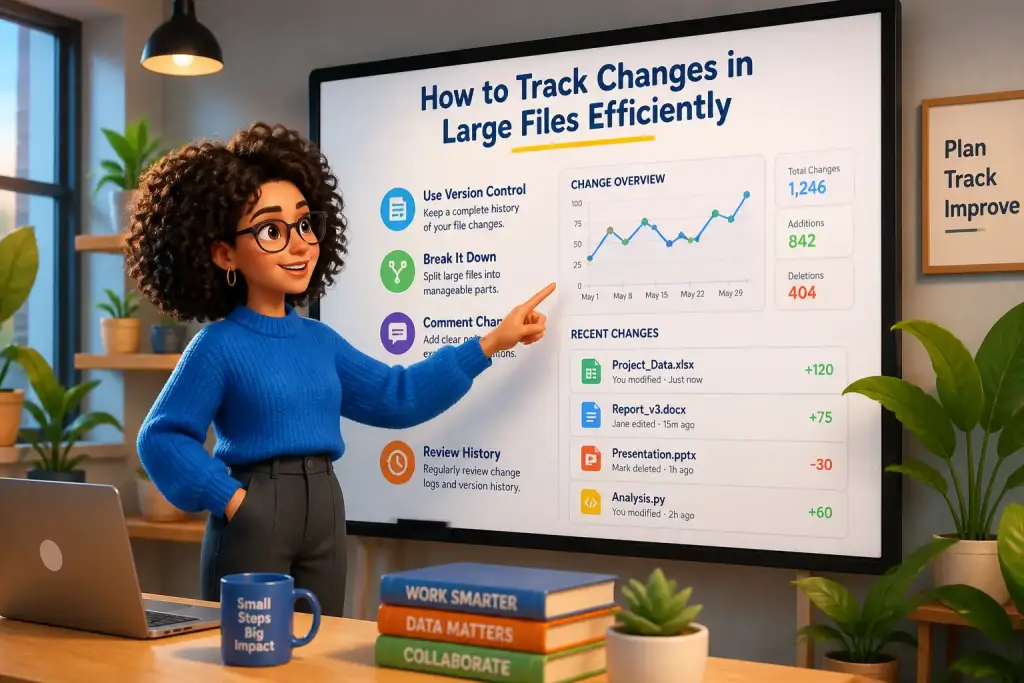
- Utilize version control systems to manage file changes effectively.
- Implement comparison tools for quick visual analysis of differences.
- Regularly back up large files to prevent data loss and ensure easy access to previous versions.
Table of Contents
- How the Importance of Change Tracking Works in Practice
- Tools for Tracking Changes in Large Files
- Implementing Version Control Systems
- Effective Document Comparison Techniques
- Regular Backup Strategies for Large Files
- Enhancing Collaboration Through Change Tracking
- Building Consistency With Mastering Change Tracking for Greater Efficiency
How the Importance of Change Tracking Works in Practice
Change tracking is essential in managing large files, particularly in collaborative environments. When numerous individuals contribute to a project, keeping track of who made what changes can prevent misunderstandings. A lack of clarity can lead to errors and wasted time, impacting overall productivity. Therefore, a robust tracking system can save time and improve results.
Using change tracking allows teams to maintain a clear record of alterations. This practice helps not only in identifying who made specific changes but also in understanding the context behind those modifications. For instance, if a team member revises a document, other collaborators can see the original text and the new version. This visibility reduces confusion and enhances communication.
Implementing a structured approach to change tracking can significantly improve project management. By regularly reviewing changes, teams can spot patterns or repeated mistakes. This insight helps in refining processes and training team members on best practices. A proactive approach leads to a more disciplined and efficient filing system.
Tools for Tracking Changes in Large Files
Today, various tools are available to help track changes in large files. These tools often come with features that cater to different needs, whether it’s document editing, software development, or data management. Some popular options include version control systems, document comparison software, and cloud-based collaboration platforms.
Version control systems like Git or Subversion are excellent for tracking changes in software development projects. They allow developers to maintain different versions of code, making it easy to revert back to previous states if needed. Additionally, these systems provide a history of changes, enabling teams to collaborate seamlessly.
Document comparison tools are essential for reviewing text-based files. They allow users to see differences between versions side by side. Tools like Diffchecker or Microsoft Word’s built-in comparison feature highlight additions, deletions, and modifications, making it easy to review changes. This visibility helps maintain version integrity and ensures everyone is on the same page.
Cloud-Based Collaboration Tools
Cloud-based platforms, such as Google Drive or Microsoft OneDrive, offer built-in change tracking features. These platforms automatically save versions of files, enabling users to revert to previous versions with ease. Collaborators can also leave comments and suggestions, facilitating discussions around specific changes. This instant feedback loop enhances collaboration and reduces the chances of errors slipping through the cracks.
Implementing Version Control Systems
Implementing a version control system can significantly enhance the tracking of changes in large files. Setting up such a system involves a few key steps. First, choose a version control tool that aligns with your needs. Git is widely used due to its flexibility and robust features, making it suitable for various projects.
Once you select a tool, creating a repository is the next step. A repository serves as a storage space for your files. All changes made to files in this repository are tracked meticulously. For example, when a team member commits changes, they write a brief message describing what was altered. This message becomes part of the version history, providing context for future reference.
- Set up a local repository on your computer or server.
- Regularly commit changes with clear messages to explain each update.
- Push changes to a remote repository for team access.
- Use branching to work on different features or fixes without affecting the main project.
Using branches allows team members to work independently on various aspects of a project. This approach prevents conflicts and keeps the main branch stable. Once changes are complete and tested, they can be merged back into the main branch, ensuring a smooth integration.
Regularly review and document changes to maintain an organized workflow and enhance team collaboration with large files.
Effective Document Comparison Techniques
Document comparison techniques are crucial for reviewing changes in large text files. These methods allow users to identify differences and ensure accuracy in collaborative documents. One effective technique involves using dedicated comparison software that highlights variations between document versions.
For example, tools like Beyond Compare or WinMerge enable side-by-side comparisons. Users can see the original document alongside the modified version, making it easy to spot changes. This visual representation is helpful, especially when dealing with lengthy documents where finding changes manually can be time-consuming.
Another effective method is to utilize built-in comparison features in software like Microsoft Word. By selecting the “Compare” function, users can quickly generate a report showing all changes. This report includes options to accept or reject modifications, offering a streamlined review process.
Best Practices for Document Comparison
Employing best practices during document comparison ensures thoroughness. Here are some key practices to follow:
- Always save a copy of the original document before starting the comparison.
- Review changes in a quiet environment to maintain focus.
- Use comments to note any concerns or suggestions for further review.
- Collaborate with another team member to gain a different perspective on changes.
Regular Backup Strategies for Large Files
Backing up large files is an essential practice to safeguard against data loss. Regular backups ensure that previous versions are accessible, providing a safety net in case of errors or unwanted changes. Implementing a robust backup strategy can save time and resources in the long run.
One effective method is to schedule automatic backups. Many cloud services offer this feature, allowing users to set specific times for backups to occur. This automation reduces the risk of forgetting to backup files manually and ensures that the latest changes are always saved.
Storing backups in multiple locations is another best practice. For instance, keeping a copy on an external hard drive in addition to cloud storage adds an extra layer of security. If one storage method fails, the other remains intact, preventing potential data loss.
Steps for Setting Up Automatic Backups
Setting up automatic backups is a straightforward process. Follow these steps:
- Select a cloud service that suits your needs.
- Create an account and install any necessary applications.
- Choose which folders or files to back up automatically.
- Set a schedule for backups, whether daily, weekly, or monthly.
- Test the backup process to ensure everything works smoothly.
Enhancing Collaboration Through Change Tracking
Collaboration is often at the heart of projects involving large files. Effective change tracking enhances this collaboration by providing clarity and maintaining organization. When team members can easily access and review changes, communication improves, and workflows become more efficient.
Regular updates on project progress can help keep everyone informed. Using tools that notify team members of changes in real-time fosters transparency. For instance, platforms like Slack can be integrated with project management tools to send alerts when significant changes occur. This immediate communication helps teams stay aligned.
Holding regular check-in meetings can facilitate discussions about changes. These meetings provide an opportunity for team members to express concerns and suggest improvements. By creating a culture of open communication, teams can collaboratively refine their processes and enhance overall productivity.
Practical Tips for Boosting Team Collaboration
- Encourage team members to document their changes and rationale for better context.
- Utilize shared documents to allow real-time editing and commenting.
- Arrange weekly review sessions to discuss changes and address any issues.
- Promote a positive feedback culture to enhance team morale.
Building Consistency With Mastering Change Tracking for Greater Efficiency
Mastering change tracking in large files is a major upgrade for productivity and collaboration. By utilizing the right tools and strategies, teams can streamline their workflows and improve their results. Emphasizing the importance of change tracking, implementing version control systems, utilizing document comparison techniques, and backing up files regularly are all essential components of an effective approach.
Building a culture of communication and collaboration enhances the overall process. Regular feedback, check-ins, and shared documentation contribute to a more efficient environment where team members feel empowered to contribute. As projects grow and evolve, the need for effective change tracking will only become more critical.
In summary, implementing these strategies will not only help track changes efficiently but also promote a collaborative atmosphere. As teams adapt to the demands of 2026 and beyond, mastering these techniques will be key to achieving success and maintaining high productivity levels.